How to Access TEAS Results
Step 1 - Access My Results
To access results, sign in to www.atitesting.com with your Username and Password. From the home page, click the My Results tab to access your full transcript.

Step 2 - Find the TEAS Assessment
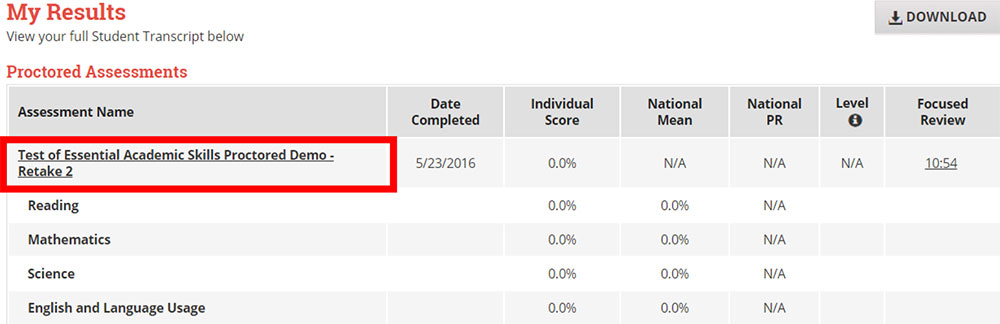
Under the Proctored Assessments section, you should find the instance of the TEAS exam that you need, and click the assessment's name to view your Individual Performance Profile.
Step 3 - Download Results
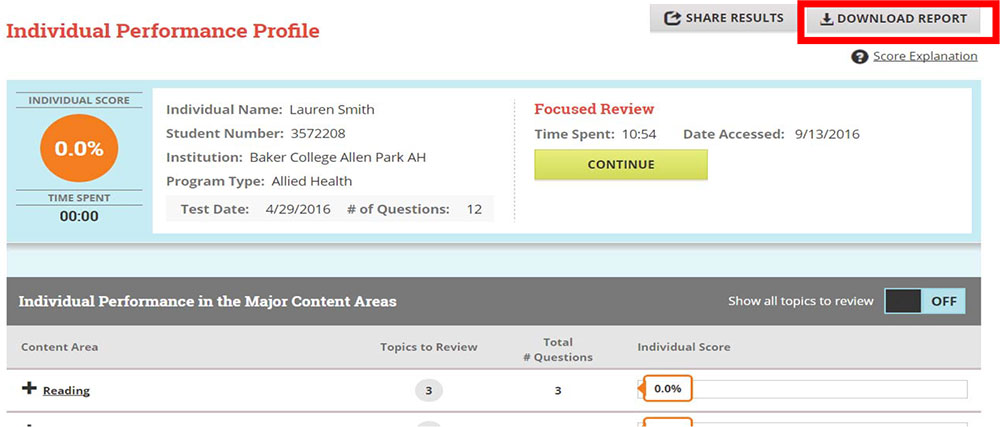
From your Individual Performance Profile, click on Download Report. This will download the results report file to your computer, where you can save in the appropriate area or print.